教學影片:Effective Navigation Development
重點語法整理:
置中範例:設定寬度,運用margin使其置中。 !!設置像素寬度,寬度即使縮小視窗也不會改變, 設置百分比寬度,寬度會隨著視窗大小作寬度的比例縮放。 .body-content { margin: 0 auto; width: 960px; }
.body-content { margin: 0 auto; width: 70%; }
雙class命名運用範例:在html的class以空白間隔開,可以設定雙class命名,方便用於css建立顏色規則 !!需用space空白鍵隔開 HTML <ul class="subnav purple">
vmaya 發表在 痞客邦 留言 (0) 人氣(166 )
Unlock the Secret to the Lens Flare in Photoshop VIDEO 有時候當我們想幫照片加上鏡頭反光Len Flare時,會遇上一些限制 解決方法的整理筆記如下: 1.複製欲加上光源效果的現有圖層 2.點選 濾鏡Filter>光源效果Render > 鏡頭反光Len flare 3.新增一個空白圖層 4.填滿黑色 5.點選 濾鏡 > 重覆上個濾鏡 Ctrl+F 6.刪除剛剛為了建立動作5的複製的圖層(已經不需要了) 7.圖層效果 >覆蓋 8.你可以選擇是否更改透明度 Opacity 9.你可以選擇是否設立光源中心點,做旋轉縮放等光源位置移動 10.你可以選擇是否加上 濾鏡 > 高斯模糊Gaussian blur 來淡化光源銳利度 或是使用圖層遮色片Mask English Note
Lens flare 光源效果 attempt 試圖;嘗試 / [əˋtɛmpt] length 尺寸的 contest 爭奪;與...競賽 I would respond to 作答,回答[+to] / [rɪˋspɑnd] get over 克服 render 使得;使成為 / [在PS中,是指光源效果] It's basically gonna say you can't do it, because the blank layer destructive 破壞的;毀滅性的[+of / to] / [dɪˋstrʌktɪv] hue 顏色;色彩; / [在PS中,是指色相] exact 確切的,精確的 / [ɪgˋzækt] screen [在PS中,是指圖層效果>覆蓋] saturation 浸透; - [物/化]飽和 [在PS中,是指飽和度] / [͵sætʃəˋreʃən] intrusive 侵入的,闖入的;打擾的;這裡指不協調的 / [ɪnˋtrusɪv] episode (整個事情中的) 一個事件 / [ˋɛpə͵sod] flirt with 一時想到,並非認真考慮 / [flɝt] Gaussian blur 高斯模糊 see more tutorial from Phlearn Pro Photoshop https://phlearn.com/product-category/pro-ph otoshop-tutorials?utm_source=Episode&utm_medium=Description%20-%20Phlearn%20PRO&utm_campaign=Youtube
vmaya 發表在 痞客邦 留言 (0) 人氣(49 )
兩欄式設定 HTML <section class="column"> <p>Lorem ipsum dolor sit amet, consectetur adipiscing elit. Donec tincidunt velit ante, non laoreet est facilisis quis. Fusce eget massa nec magna suscipit finibus ut non lacus. Nam vel aliquam mi, eget rhoncus eros. In malesuada, erat quis accumsan rutrum, risus nunc vulputate ipsum, ut fringilla magna nisi non neque. </p> </section>
CSS .column{ width:380px; padding:0 5px; float:left; } .column:first-of-type{ margin-right:10px; }
2.6 Inline Elements 使用 <span> 標籤的屬性,來設定padding,可運用使其內縮首行與擴張行尾。 此屬性與其他Element效果不同。 Examples of inline elements: <span><a><img> 2.7 Box-Sizing https://webdesign.tutsplus.com/courses/understanding-the-css-box-model/lessons/box-sizing
更清晰的解釋請參考這個網址 http://zh-tw.learnlayout.com/box-sizing.html
vmaya 發表在 痞客邦 留言 (0) 人氣(7 )
vmaya 發表在 痞客邦 留言 (0) 人氣(253 )
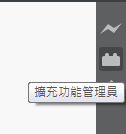
用於省去開啟新檔案時,保留基礎的起始語法 下載 Brackets-HTML-Templates這套外掛 https://github.com/talmand/Brackets-HTML-Templates 打開Brackets這套軟體,點選右側的快捷圖示"擴充功能管理員"
在彈出視窗下方選擇由URL安裝或是直接將下載的ZIP拖拉至方形虛線框形中進行安裝
使用方法 1.必須先點選左側任一個別檔案(非資料夾) 2.上方 編輯>HTML Templates... 3.選擇樣板類別-開啟完成
vmaya 發表在 痞客邦 留言 (0) 人氣(518 )
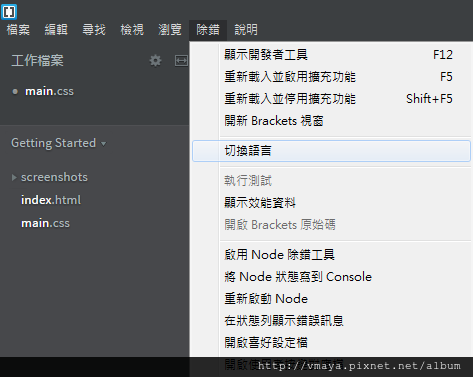
這套軟體可自由切換至繁體中文
安裝完以後,也可以透過左側的index.html來學習基本功能
將滑鼠游標停留在html標籤上,按下快捷鍵ctrl+E 便可以立即查看相關的css規則
按下快捷鍵ESC就可以關閉CSS規格顯示視窗 按下快捷鍵 Ctrl + Alt + P 便可以即使預覽,或是按下右上角的閃電圖騰
vmaya 發表在 痞客邦 留言 (0) 人氣(808 )
快捷提示:別忘記Viewport Meta標籤 http://webdesign.tutsplus.com/zh-hans/articles/quick-tip-dont-forget-the-viewport-meta-tag--webdesign-5972?ec_unit=dropdown-language 下列的值可以作為我們的默認設定模版:
< meta name = "viewport" content = "width=device-width, initial-scale=1" >
結論 流動式的網頁佈局設計不僅僅是給那些喜歡調整他們瀏覽器大小的人所用的, 它為的是能滿足不同設備,屏幕和分辨率的需要!當你在做流動式設計的時候, 加入viewport meta標籤,並且在CSS裡面設定@viewport的準則,你就萬事無憂了。
相似的viewport屬性在CSS裡用the @viewport rule進行定義而不是在HTML裡面
@viewport{ zoom: 1.0 ; width : device-width; }
vmaya 發表在 痞客邦 留言 (0) 人氣(236 )
div:selection{ color:black; background-color:yellow; } div:first_letter{ font-size:36px } div:first-line{ font-size:24px; color:green; } https://youtu.be/Vafp5xr_bxk?t=1h24m div:first-child::first_letter{ font-size:36px } div:first-child::first-line{ font-size:24px; color:green; } https://youtu.be/Vafp5xr_bxk?t=1h25m
Talking about pseudo class & pseudo elements :: detail https://youtu.be/Vafp5xr_bxk?t=1h29m26s Talking about text sizing, useing by rem & em, tell you what's different between this two s https://youtu.be/Vafp5xr_bxk?t=1h33m
Module Overview https://youtu.be/Vafp5xr_bxk?t=1h48m 範例一 https://youtu.be/Vafp5xr_bxk?t=1h57m30s body{ width:500px;/*若未寫 則是取決與視窗大小*/ } #header{ width:100%;/*此處的寬度取決於body*/ height:70px; background-color:#000; z-index:10; position:fixed;/*keep top of the page*/ } #header li{ display:inline;/*僅用來next to each other*/ }
CSS Box Model https://youtu.be/Vafp5xr_bxk?t=2h4m14s
vmaya 發表在 痞客邦 留言 (0) 人氣(35 )
vmaya 發表在 痞客邦 留言 (0) 人氣(299 )
vmaya 發表在 痞客邦 留言 (1) 人氣(689 )