- 11月 25 週五 201116:46
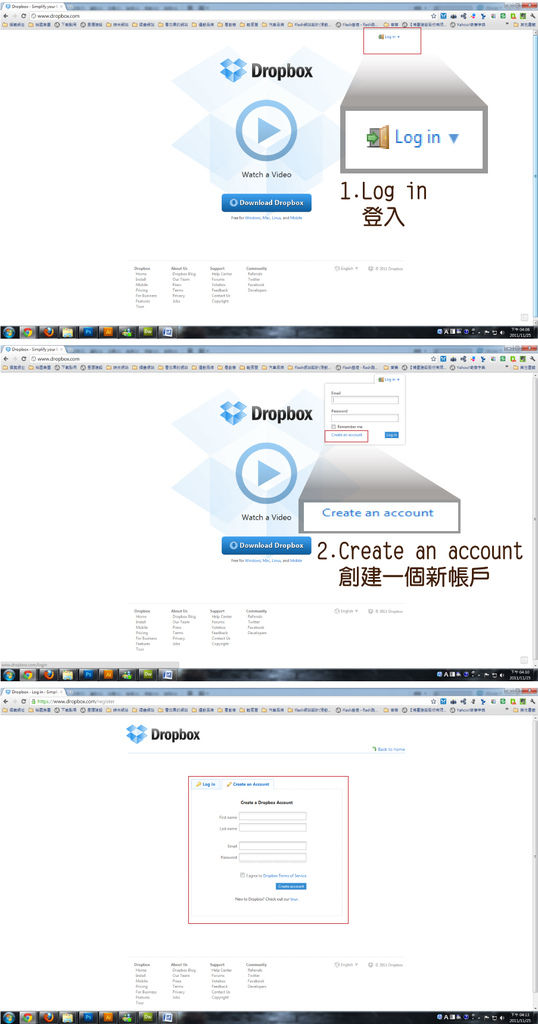
[教學]網路免費硬碟,Dropbox教學基本說明
- 11月 25 週五 201115:15
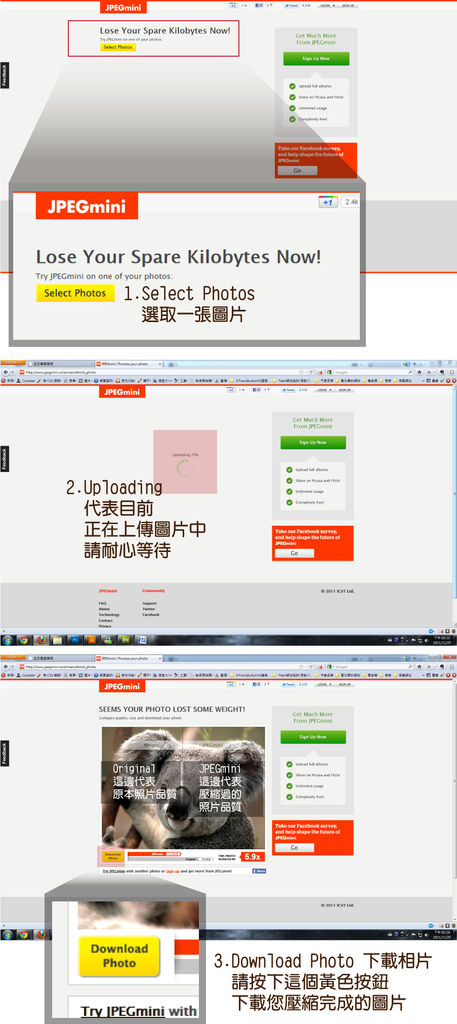
[教學]JPEGmini 線上壓縮照片不失真
假如我需要把照片的影像尺寸縮小一點
可是我不會Photoshop,
那我的生活照怎麼辦呢?
有一個線上網站叫做JPEGmini
可以幫你做簡單的相片壓縮又不失真
- 8月 03 週三 201113:00
瀏覽器與你的IQ~其實沒多大關係之各大瀏覽器列表
選擇A:Google Chrome
官方網站:http://www.google.com/chrome/?hl=zh-TW
選擇B:Mozillla Firefox
官方網站:http://moztw.org/
選擇C:Cimino
官方網站:http://caminobrowser.org/
選擇D:Opera
官方網站:http://www.opera.com/
選擇E:Safire
官方網站:http://www.apple.com/tw/safari/download/
選擇F:KKMAN
官方網站:http://www.kkbox.com.tw/kkman/index.html
選擇G:世界之窗
官方網站:http://www.theworld.cn/tw/
選擇H:IE
官方網站:http://windows.microsoft.com/zh-TW/internet-explorer/products/ie/home
選擇I:Maxthon
官方網站:http://www.maxthon.cn/
選擇J:Sleipnir
官方網站:http://www.fenrir-inc.com/global/
選擇K:Lunascape
官方網站:
http://www.lunascape.tv/
選擇L:Seamonkey
官方網站:
http://www.seamonkey-project.org/
選擇M:Flock
官方網站:http://flock.com/
選擇N:Stainlessapp
官方網站:http://www.stainlessapp.com/
選擇O:Swiftfox
官方網站:http://getswiftfox.com/
選擇P:Konqueror
官方網站:http://konqueror.kde.org/
- 7月 25 週一 201121:48
每周的Painter課~
- 7月 16 週六 201111:00
CMP BLOCK的CMP TALK第四擊~百萬知名部落格Choyce-談勇氣之心得感想
- 4月 11 週一 201123:26
小紅傘 Autorun.inf 解除自動封鎖問題
- 3月 19 週六 201115:26
Xoops移機到er-webs的修改筆記
移機到er-webs讓我遇到滿多問題,有些地方也模糊不清,
所以我在er-webs端,先安裝了一個xoops,然後下載需要修改的兩個檔案來作比較。
STEP01.xoops.sql(資料庫匯出)
STEP02.mainfile.php
1.請先在er-webs新增一個資料庫localxoops201
2.將我安裝在localhost的xoops的資料庫匯出,我用owner的身分
3.用editplus打開xoops.sql這個檔案,
STEP01修改如下:
------------------------------------------------------------------------------------------------
A.
13行
原
-- 資料庫:xoops`
改
-- 資料庫: `使用者名稱_localxoops201`
B.
83.84.85行
原
INSERT INTO `xoops_banner` VALUES (1, 1, 0, 1, 0, 'http://localhost/xoops/images/banners/xoops_banner.gif', 'http://www.xoops.org/', 1008813250, 0, '');
INSERT INTO `xoops_banner` VALUES (2, 1, 0, 1, 0, 'http://localhost/xoops/images/banners/xoops_banner_2.gif', 'http://www.xoops.org/', 1008813250, 0, '');
INSERT INTO `xoops_banner` VALUES (3, 1, 0, 1, 0, 'http://localhost/xoops/images/banners/banner.swf', 'http://www.xoops.org/', 1008813250, 0, '');
改
INSERT INTO `xoops_banner` VALUES (1, 1, 0, 1, 0, 'http://mulanmind.er-webs.com/htdocs/localxoops201/images/banners/xoops_banner.gif', 'http://www.xoops.org/', 1008813250, 0, '');
INSERT INTO `xoops_banner` VALUES (2, 1, 0, 1, 0, 'http://mulanmind.er-webs.com/htdocs/localxoops201/images/banners/xoops_banner_2.gif', 'http://www.xoops.org/', 1008813250, 0, '');
INSERT INTO `xoops_banner` VALUES (3, 1, 0, 1, 0, 'http://mulanmind.er-webs.com/htdocs/localxoops201/images/banners/banner.swf', 'http://www.xoops.org/', 1008813250, 0, '');
C.
1220行
原
INSERT INTO `xoops_users` VALUES (1, '', 'admin', 'allem@gmail.com', 'http://localhost/xoops/', 'blank.gif', 1300025057, '', '', '', 1, '', '', '', '', '202cb962ac59075b964b07152d234b70', 0, 0, 7, 5, 'bcool_flex', 0.0, 1300462968, 'thread', 0, 1, 0, '', '', '', 0);
改
INSERT INTO `xoops_users` VALUES (1, '', 'admin', 'allem@gmail.com', 'http://mulanmind.er-webs.com/htdocs/localxoops201', 'blank.gif', 1300025057, '', '', '', 1, '', '', '', '', '202cb962ac59075b964b07152d234b70', 0, 0, 7, 5, 'bcool_flex', 0.0, 1300462968, 'thread', 0, 1, 0, '', '', '', 0);
D.
進入er-webs的後台,打開剛剛新增的資料庫localxoops201,全名為 你的使用者名稱_localxoops201
這部分的修改就完成拉!
STEP02.修改如下
用editplus打開mainfile.php這個檔案
-------------------------------------------------------------------------------------------------------------------------------------------
A.
33.34行
原
// Example: define('XOOPS_ROOT_PATH', 'C:/AppServ/www/xoops');
define('XOOPS_ROOT_PATH', 'C:/AppServ/www/xoops');
改
// Example: define('XOOPS_ROOT_PATH', '/home/vol12/er-webs.com/使用者名稱/htdocs/localxoops201');
define('XOOPS_ROOT_PATH', '/home/vol12/er-webs.com/使用者名稱/htdocs/localxoops201');
B.
38.39行
原
// Example: define('XOOPS_URL', 'http://localhost/xoops');
define('XOOPS_URL', 'http://localhost/xoops');
改
// Example: define('XOOPS_URL', 'mulanmind.er-webs.com/localxoops201');
define('XOOPS_URL', 'http://mulanmind.er-webs.com/localxoops201');
c.
62-84行
原
// Database
// Choose the database to be used
define('XOOPS_DB_TYPE', 'mysql');
// Table Prefix
// This prefix will be added to all new tables created to avoid name conflict in the database. If you are unsure, just use the default 'xoops'.
define('XOOPS_DB_PREFIX', 'xoops');
// Database Hostname
// Hostname of the database server. If you are unsure, 'localhost' works in most cases.
define('XOOPS_DB_HOST', 'localhost');
// Database Username
// Your database user account on the host
define('XOOPS_DB_USER', 'owner');
// Database Password
// Password for your database user account
define('XOOPS_DB_PASS', '12345');
// Database Name
// The name of database on the host. The installer will attempt to create the database if not exist
define('XOOPS_DB_NAME', 'xoops');
改
// Database
// Choose the database to be used
define('XOOPS_DB_TYPE', 'mysql');
// Table Prefix
// This prefix will be added to all new tables created to avoid name conflict in the database. If you are unsure, just use the default 'xoops'.
define('XOOPS_DB_PREFIX', 'xoops');
// Database Hostname
// Hostname of the database server. If you are unsure, 'localhost' works in most cases.
define('XOOPS_DB_HOST', 'MySQL 主機名稱');
// Database Username
// Your database user account on the host
define('XOOPS_DB_USER', '使用者名稱');
// Database Password
// Password for your database user account
define('XOOPS_DB_PASS', '使用者密碼');
// Database Name
// The name of database on the host. The installer will attempt to create the database if not exist
define('XOOPS_DB_NAME', '資料庫名稱全名');
上傳到er-webs你放置xoops檔案的資料夾中。完成拉!
- 2月 18 週五 201111:48
Win7 Msn雙開怎麼辦呢?
32位元
開始> 附屬應用程式> 執行> 鍵入"regedit" 到 HKEY_LOCAL_MACHINE\SOFTWARE\Microsoft\Windows Live\Messenger,然後在右邊空白處點右鍵,新增 DWORD值 名稱: MultipleInstances,將其數值設為1 即可雙開!
64位元
開始> 附屬應用程式> 執行> 鍵入"regedit" 到 HKEY_LOCAL_MACHINE\SOFTWARE\Wow6432Node\Microsoft\Windows Live\Messenger,然後在右邊空白處點右鍵,新增 DWORD值 名稱: MultipleInstances,將其數值設為1 即可雙開!
引自
- 12月 26 週日 201011:30
好用firefox 附加元件、Firefox外掛、擴充套件、
我用firefox一定要安裝的套件^^,
以下這幾種是我幾乎必安裝的外掛!給大家參考一下囉!
1.
軟體名稱:IE Tab Plus[讓瀏覽器擁有IE、Firefox雙核心] *支援Firefox4.x
- 10月 22 週五 201020:23
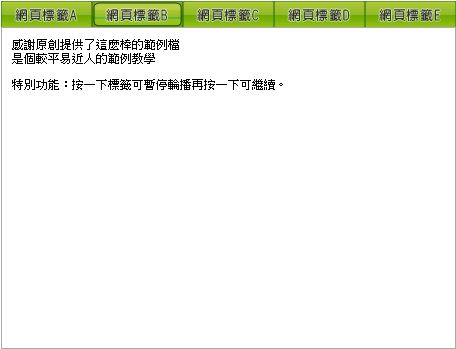
javascript-滑動頁籤-仿Yahoo頁籤選單(會輪播)